

• Slide 1 Title

    Go to Blogger edit html and replace these slide 1 description with your own words. ...

  • Slide 2 Title

    Go to Blogger edit html and replace these slide 2 description with your own words. ...

  • Slide 3 Title

    Go to Blogger edit html and replace these slide 3 description with your own words. ...

  • Slide 4 Title

    Go to Blogger edit html and replace these slide 4 description with your own words. ...

  • Slide 5 Title

    Go to Blogger edit html and replace these slide 5 description with your own words. ...

Subscribe via email

Enter your email address:

Delivered by FeedBurner

Wednesday, 2 February 2011

How to install turbo C Compiler


Turbo C was an Integrated Development Environment and compiler for the C programming language from Borland. It was first introduced in 1987 and was noted for its integrated development environment, small size, extremely fast compile speed and comprehensive manuals.

In May 1990, Borland replaced Turbo C with Turbo C++.

Here we going to talk about Turbo C++ 3.0 version. it is best of all version and widely used by students.

Turbo C++ 3.0 was released in 1991. Initially released as an MS-DOS compiler, 3.0 supported C++ templates, Borland’s inline assembler, and generation of MS-DOS mode
To install turbo c compiler

1. First you need to download the compiler.

2. After finished download unzip the turbo c to folder & open the folder.

3. Run install.exe  and press ENTER to continue.


4.Enter the SOURCE drive to use: C


5. Enter the SOURCE Path: source path is where you extracted the turbo c.zip file we don’t need to give the source it will find and take automatically. you just press ENTER at this step.

6. Then scroll down by arrow key and Start Installation.
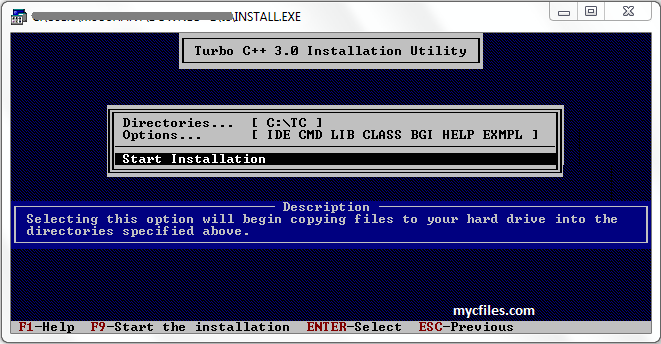
Now you have successfully installed turbo c compiler.

Now to open the turbo c compiler
go to Drive C > TC > Bin > TC .exe


You can have shortcut on desktop so that no need to follow long path to open TC.
Just open TC folder in drive C  select TC.exe and right click on it, Click on send to> Desktop (create shortcut).

Now Just 1 thing “Rock the Code..”

hope you liked this post, please comment below to express your feelings… :)

also read:


What is C


C is one of the most popular programming languages of all time


C (pronounced "See") is a general-purpose computer programming language developed in 1972 by Dennis MacAlistair Ritchie at the Bell Telephone Laboratories for use with the UNIX operating system. The origin of C is closely tied to the development of the Unix operating system.


C is an imperative (procedural) systems implementation language. It was designed to be compiled using a relatively straightforward compiler, to provide low-level access to memory, to provide language constructs that map efficiently to machine instructions, and to require minimal run-time support. C was therefore useful for many applications that had formerly been coded in assembly language.


Many people say C is old language now, but it is the basic language of all other. Operating system like Windows, UNIX, Linux still written in C. microprocessors are used in all electronic devices, C is used to interact with this microprocessors not only to work fast & to take less memory space.


“it all depends on how you C it” – Yashavant Kanetkar.


Hope you like this post, Comment Below… :)


also read


How to install turbo C Compiler


Increase Turbo C Compiler Size in Windows 7

 
  • Recent Articles

  • Popular Articles

  • Recent Comments